
Custom Word Search Generator: Advanced Features You Need to Know
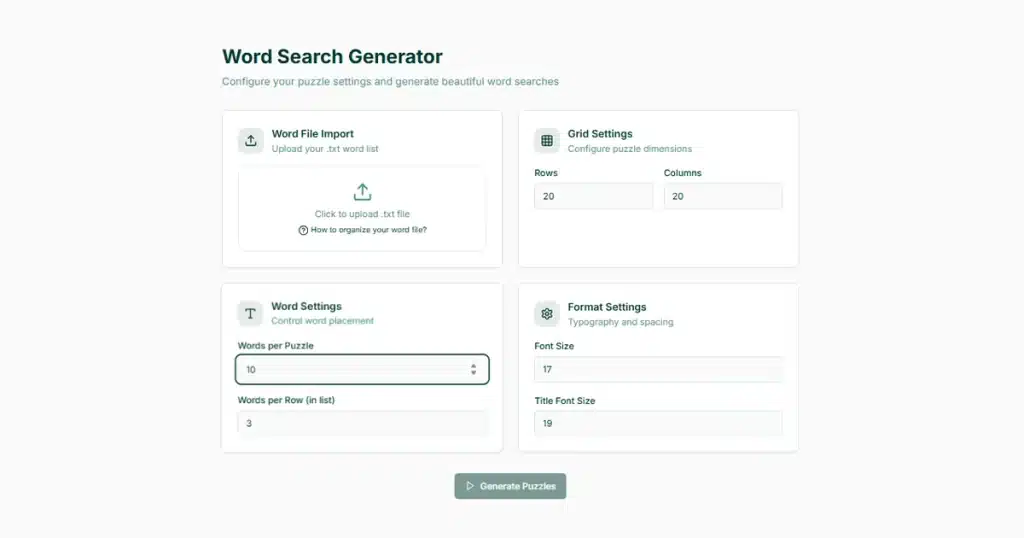
Creating basic word searches is easy. Making professional puzzles requires a custom word search generator with advanced features.
Standard word search tools add words and print grids. Professional custom word search generators give you control over grid size, font selection, difficulty settings, answer keys, and layout options. These features matter when you create puzzles for publication or sale.
This guide covers advanced customization features that separate amateur puzzles from professional products. You’ll learn which settings affect puzzle quality, how to adjust difficulty for different audiences, and which features matter most for print publishing. For a complete overview of word search creation from beginner to advanced, see our complete word search maker guide.
free demo to test advanced customization features without signing up
Custom Word Search Grid Sizing and Dimensions
Grid size affects puzzle difficulty and page layout. Small grids (10×10) work for kids. Large grids (25×25) challenge adults.
Most free tools lock you into one or two grid sizes. Professional tools let you set exact dimensions.
Standard Grid Sizes:
- 10×10: Kindergarten through 2nd grade
- 15×15: Elementary and middle school
- 20×20: High school and adults
- 25×25: Expert-level puzzles
Custom dimensions matter for book publishing. A 20×22 grid fits an 8.5×11 page better than a perfect square. Rectangular grids offer greater layout flexibility.
The best generators let you input exact row and column counts. This control helps you match specific page sizes or create unique puzzle shapes.
Why Grid Size Matters:
Larger grids hold more words but become harder to solve. A 10×10 grid maxes out at about 10 words. A 25×25 grid can comfortably hold 40 or more words.
Your grid choice affects printing costs, too. Larger grids need more page space or smaller fonts. Plan your grid size based on your final page dimensions.
Custom Word Search Font Selection and Typography
Font choice affects readability and professional appearance. The wrong font makes puzzles hard to read or look amateurish.
Key Font Considerations:
Letter Spacing: Characters need clear separation between them. Cramped letters blend. Too much space looks unprofessional.
Font Weight: Medium to bold fonts work best for puzzles. Light fonts disappear when printed. Extra bold fonts waste space.
Font Style: Sans-serif fonts (Arial, Helvetica) provide better clarity than serif fonts (Times New Roman). Script or decorative fonts fail completely in puzzle grids.
Professional word search generators offer 5-10 font choices optimized for puzzle readability. Basic tools give you one font or none at all.
Recommended Fonts:
- Arial: Clean, readable, prints well
- Courier: Monospace, consistent letter width
- Verdana: Designed for screen reading, prints clearly
- Helvetica: Professional appearance, excellent readability
Font size matters as much as font choice. Standard puzzle fonts range from 10pt to 14pt. Smaller fonts fit more words but strain eyes. Larger fonts improve readability but limit grid capacity.
Large print word searches need 16pt to 18pt fonts. These puzzles target seniors or people with vision difficulties. [Add internal link to Article #10 using anchor text “word search layout and font best practices”]
Professional puzzle designers recommend sans-serif fonts at 11pt minimum for adult puzzles and 14pt for children’s puzzles for optimal readability.
Difficulty Level Controls
Difficulty settings control how words appear in the grid. Basic puzzles place words only horizontally and vertically. Advanced puzzles add diagonal, backward, and overlapping words.
Difficulty Options:
Beginner Mode:
- Horizontal words only
- Left-to-right direction
- No overlapping
- Larger fonts
Intermediate Mode:
- Horizontal and vertical
- Forward and backward
- Limited diagonal placement
- Some word overlap
Advanced Mode:
- All eight directions
- High word density
- Maximum overlap
- Smaller letter spacing
Expert Mode:
- Diagonal emphasis
- Backward words common
- Dense letter packing
- Challenging letter distribution
Word direction dramatically affects solve time. Horizontal-only puzzles take 2-3 minutes. Eight-direction puzzles take 10-15 minutes with the same word list.
Overlap settings control how many words share letters. No overlap creates easier puzzles with more space. Maximum overlap creates dense, challenging grids.
Random letter fill affects difficulty, too. Some generators use truly random letters. Others place common letters (E, A, T) more frequently. Strategic letter distribution makes puzzles harder by creating false word patterns.
Word Placement Options
Word placement controls give you precise control over puzzle construction. Basic generators place words randomly. Advanced tools let you specify placement rules.
Placement Controls:
Minimum Word Length: Set the shortest word allowed. Filtering out 2-3 letter words increases difficulty.
Maximum Word Count: Limit how many words appear per puzzle. More words create denser, more challenging puzzles.
Word Distribution: Control how evenly words spread across the grid. Clustered words create hot spots. Distributed words balance difficulty.
Direction Weighting: Set percentages for each direction. Make 50% horizontal, 30% vertical, 20% diagonal for balanced puzzles.
Some tools let you manually place specific words. This feature helps when certain words must appear in specific locations for thematic reasons.
Priority Word Settings:
Mark certain words as priority placements. The generator places these first and builds around them. This ensures your most important vocabulary words always appear.
Exclusion zones let you block certain grid areas. This matters when your puzzle includes decorative elements or when you need space for titles and instructions.
Answer Key Customization
Answer keys need customization options just like puzzles. Professional publishers need flexible answer formats.
Answer Key Formats:
Word List Only: Simple list showing all hidden words. Takes minimal space.
Highlighted Grid: Full grid showing each word’s location with highlighting or circles.
Separate Page: Answer key on its own page, matched to puzzle page number.
Overlay Format: Transparent answer key that overlays the original puzzle.
Color options matter for answer keys. Some audiences prefer colored highlights. Others need black-and-white for photocopy compatibility.
Answer key placement affects book layout. End-of-book answers save page space but frustrate quick checkers. Back-of-page answers provide instant feedback but require careful printing.
[Add internal link to Article #6 using anchor text “word search puzzle generator for KDP publishing”] explains the answer key requirements for Amazon book formatting.
Custom Answer Key Features:
- Toggle word list visibility
- Change highlight colors
- Adjust line thickness for circled words
- Add page references
- Include difficulty ratings
Custom Word Search Layout and Formatting Features
Layout tools control how puzzles appear on the page. These settings affect both digital and print versions.
Page Layout Options:
Margins: Set top, bottom, left, and right margins independently. Standard margins are 0.5 to 0.75 inches. Bleed requirements need 0.125 inch extra.
Title Placement: Position puzzle titles above, below, or beside grids. Choose font sizes separate from grid fonts.
Word List Position: Place word banks above, below, left, or right of grids. Some layouts split word lists into columns.
Instructions Area: Add space for puzzle instructions or rules. Control text size and position.
Page Numbers: Add automatic page numbering with custom formats and positions.
Professional generators offer template systems. Save your preferred layout settings and reuse them across multiple puzzles. This consistency matters when creating puzzle books with 50 or 100 pages.
Trim Size Compatibility:
Different publishing platforms require specific page sizes. Amazon KDP uses:
- 6×9 inches
- 8.5×11 inches
- 8×10 inches
Etsy printables commonly use:
- 8.5×11 inches (US Letter)
- A4 (international)
Your generator should offer preset trim sizes or let you input custom dimensions. Grid dimensions should auto-adjust to fit your chosen page size.
Amazon KDP provides detailed specifications for book interior formatting in it’s content guidelines.
Export and File Settings
Export options determine your puzzle’s final format and usability. Different projects need different file types.
File Format Options:
PDF: Best for printing and publishing. Supports high resolution and professional output. Required for KDP and most print services.
PNG/JPG: Good for digital use and social media. Not ideal for print quality.
SVG: Vector format that scales without quality loss. Useful for graphic design integration.
Word/DOCX: Editable format for further customization. Loses some formatting control.
Print-ready PDFs need specific settings:
- 300 DPI minimum resolution
- CMYK color mode for commercial printing
- Embedded fonts
- Proper bleed settings
- Crop marks for trim
Free generators often limit you to 150 DPI or screen resolution. Professional tools export at print quality automatically.
The best word search generator tools compare export capabilities across different platforms.
Batch Export Features:
Create multiple puzzles and export them together. This saves time when building puzzle books with many pages.
Some generators create ready-to-upload files with:
- Combined PDF of all puzzles
- Separate answer key PDF
- Proper page numbering
- Table of contents
- Copyright pages
Print Quality Options
Print quality settings separate amateur printables from professional publications. These technical specifications affect how puzzles look in physical form.
Resolution Settings:
72 DPI: Screen only, never for print 150 DPI: Acceptable for home printing 300 DPI: Standard for professional printing 600 DPI: Premium quality, larger file sizes
Always use 300 DPI or higher for anything you sell. Lower resolution looks fuzzy or pixelated when printed.
Color Mode:
RGB: Computer screens and digital display CMYK: Commercial printing presses Grayscale: Black and white printing
Most word searches use grayscale mode. This reduces file size and printing costs. Color puzzles need CMYK mode for professional printing.
Line Weight:
Grid lines need proper thickness. Too thin and they disappear when printed. Too thick, and they overpower the letters.
Standard line weights:
- 0.5pt: Subtle, clean look
- 1pt: Standard visibility
- 1.5pt: Bold, easy to see
- 2pt+: Too heavy for most uses
Professional printing standards require a minimum of 300 DPI to ensure sharp, high-quality puzzle grids suitable for publishing.
Batch Processing Features
Batch processing creates multiple puzzles automatically. This feature saves hours when creating puzzle books.
Batch Creation Options:
Themed Sets: Generate 10 puzzles about animals, 10 about sports, 10 about food. The tool pulls from themed word lists automatically.
Difficulty Progression: Create a series that starts easy and gets harder. Puzzle 1 uses beginner settings. Puzzle 50 uses expert settings.
Automatic Variation: Same word list, different grid arrangements. Create practice sets where students solve the same vocabulary multiple ways.
Professional batch tools let you:
- Upload word lists in bulk
- Set different parameters for each batch
- Generate answer keys automatically
- Export everything as one print-ready file
Time Savings:
Manual creation: 15-20 minutes per puzzle, Batch processing: 50 puzzles in 10 minutes
This efficiency matters when selling puzzle books. You can create a complete 100-page book in under an hour.
Quality Control:
Good batch processors show previews before final export. Review each puzzle to catch:
- Words that didn’t fit
- Awkward letter distributions
- Layout problems
- Inconsistent formatting
Advanced Tips for Professional Results
Professional word search creators use specific techniques to improve puzzle quality and marketability. Whether you’re new to puzzle creation or looking to refine your skills, these strategies help you create puzzles that stand out in competitive markets.
Consistency Matters:
Use the same fonts, grid sizes, and layout throughout a book. Readers notice inconsistent formatting. It looks unprofessional.
Create templates for different puzzle types:
- Kids template: 12×12 grid, 14pt Arial, horizontal/vertical only
- Adult template: 20×20 grid, 11pt Courier, all directions
- Large print template: 15×15 grid, 18pt Verdana, limited directions
Test Your Puzzles:
Solve a few puzzles yourself or have others test them. Check for:
- Appropriate difficulty for your target audience
- Clear, readable fonts at print size
- All words are actually findable
- Answer keys match puzzles exactly
Theme Coordination:
Match your customization to your theme. Holiday puzzles might use festive fonts. Educational puzzles need clean, academic styling. Kids’ puzzles can use rounder, friendlier fonts.
Our professional word search creator guide covers theme selection and audience targeting in detail.
Avoid Common Mistakes:
Don’t cram too many words into small grids. This creates frustrating, nearly impossible puzzles.
Don’t use fonts smaller than 10pt. Even adults struggle with tiny letters.
Don’t skip answer keys. Customers expect them.
Don’t forget to check print previews. Screen appearance differs from printed results.
Create professional custom word searches in minutes with KDPTools.
no credit card required
Professional Polish:
Add subtle design elements:
- Border around the grid
- Decorative header with themed graphics
- Footer with puzzle number and difficulty
- Copyright notice
These small touches make your puzzles look published rather than homemade. For comprehensive guidance on creating market-ready puzzle books, explore our Word Search Maker Complete Guide.
FAQ Section
What’s the difference between free and paid custom word search generators?
Free generators offer basic customization like grid size and word direction. Paid generators add advanced features, including batch processing, custom fonts, exact dimension control, print-quality export, answer key customization, and template systems. Free tools work for occasional personal use. Paid tools matter for publishing and commercial projects.
How do I choose the right grid size for my custom word search?
Match grid size to your audience and word count. Kids under 8 need 10×10 to 12×12 grids. Teens handle 15×15 to 18×18. Adults work with 20×20 or larger. Your word count matters too. Each word needs approximately 1.5 to 2 grid squares. A 15×15 grid (225 squares) comfortably holds 15-20 words.
Can I create custom word search shapes instead of rectangular grids?
Some advanced generators support shaped puzzles like hearts, stars, or seasonal shapes. These require specialized tools. Most standard generators stick to rectangular grids. Shaped puzzles look impressive but take longer to solve and don’t work well in book formats. Use them for special occasions or standalone printables rather than book content.
What resolution do I need for printing custom word searches?
Use 300 DPI minimum for professional printing. This applies to puzzle books, printables you sell, and anything published on Amazon KDP or similar platforms. Home printing tolerates 150 DPI but looks noticeably worse. Never use 72 DPI for anything printed. Digital-only puzzles displayed on screens can use lower resolutions.
How many customization options do I really need?
Start with essential features: grid size control, difficulty settings, font choice, and PDF export at 300 DPI. Add batch processing if you create puzzle books. Add custom dimensions if you sell printables in multiple sizes. Skip fancy features like colored grids or decorative borders unless your specific audience demands them. Most successful puzzle publishers use 5-6 core customization features consistently.
KDPTools Content Team creates simple, practical guides to help publishers make high-quality puzzle books using smart automation tools like Word Search Generator, and Word Search Book Builder.
We focus on clear tutorials, fast workflows, and print-ready puzzle interiors for Amazon KDP and Etsy.